
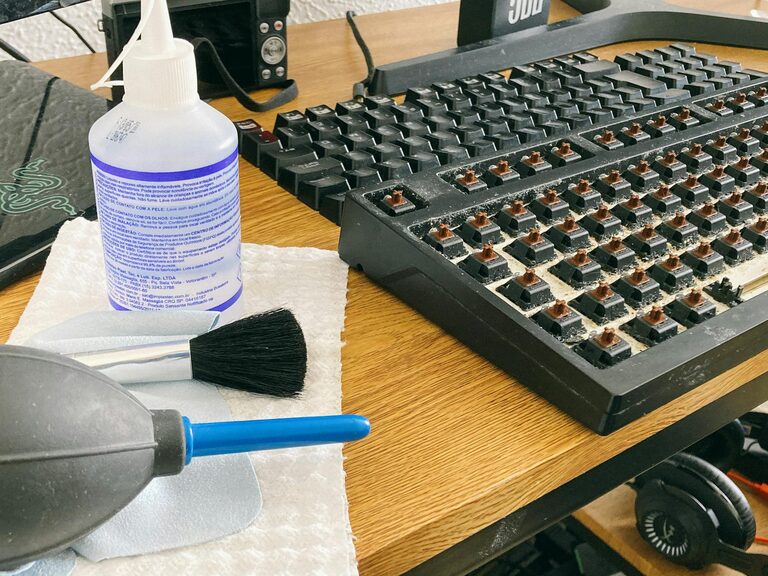
Keeping your phone and keyboard clean is essential for both hygiene and the longevity of your devices. These everyday tools can harbor dust, bacteria, and grime, making regular cleaning a smart habit. However, it’s important to approach this task carefully to avoid damage. This guide will walk you through safe and effective methods for cleaning your phone and keyboard.
Why Clean Your Phone and Keyboard?
Your phone and keyboard are two of the most frequently touched items in your daily routine. Over time, oils from your skin, food particles, dust, and germs accumulate on their surfaces. Cleaning them regularly:
– Reduces the spread of bacteria and viruses
– Improves device appearance and functionality
– Prevents build-up that can interfere with keys or buttons
– Prolongs the life of your devices
By following safe cleaning techniques, you ensure these benefits without the risk of damaging sensitive electronics.
What You’ll Need
Before you start cleaning, gather the following supplies:
– Microfiber cloths (avoid abrasive materials)
– Cotton swabs
– Isopropyl alcohol (70% concentration or less)
– Distilled water
– Small spray bottle (optional)
– Soft brush or compressed air canister
Avoid using bleach, harsh chemicals, or paper towels, as these can harm your devices.
How to Clean Your Phone Safely
Phones have sensitive screens and openings like charging ports and speakers. Here’s a step-by-step process to clean your phone without risking damage.
1. Turn Off and Unplug Your Phone
Always power down your device before cleaning. Disconnect any cables or accessories.
2. Remove the Case
If you use a case, remove it and clean it separately. Many cases can be washed with mild soap and water—check the manufacturer’s instructions.
3. Prepare Your Cleaning Solution
Mix equal parts distilled water and isopropyl alcohol in a spray bottle or bowl. If you prefer, you can use pre-moistened alcohol wipes designed for electronics.
4. Wipe the Screen and Body
Lightly dampen a microfiber cloth with your cleaning solution. Avoid spraying the solution directly onto the phone. Gently wipe the screen and all surfaces. Use a dry part of the cloth to remove any excess moisture.
5. Clean Ports and Small Areas
Use a dry cotton swab or compressed air to remove dust and debris from charging ports, headphone jacks, and speakers. Be gentle to avoid pushing debris further inside.
6. Let Your Phone Dry Completely
Allow your phone to air dry before turning it back on or reattaching the case.
How to Clean Your Keyboard Safely
Keyboards often collect dust, crumbs, and dirt between the keys. Cleaning them helps maintain performance and hygiene.
1. Disconnect or Power Off
If you’re cleaning a wired keyboard, unplug it. For wireless keyboards, turn them off or remove batteries.
2. Remove Loose Debris
Turn the keyboard upside down and gently shake it to dislodge crumbs. Use compressed air to blow out dust and small particles from between keys.
3. Clean the Surface
Dampen a microfiber cloth with a solution of equal parts water and isopropyl alcohol. Wipe the keys and surfaces carefully. Avoid using excessive liquid.
4. Detail Cleaning Between Keys
For stubborn dirt, lightly dampen a cotton swab and clean around the edges of the keys. If your keyboard has removable keys, check manufacturer guidance before removing any.
5. Deep Cleaning (Optional)
For mechanical keyboards or ones with removable keys, you can remove the keycaps and soak them in warm, soapy water. Make sure they are completely dry before reinstalling.
6. Let It Dry
Wait a few minutes to ensure all moisture has evaporated before reconnecting or powering on.
Additional Tips for Long-Term Maintenance
– Wash your hands before using your devices to reduce grime buildup.
– Avoid eating or drinking near your keyboard or phone.
– Regularly wipe devices to prevent heavy accumulation.
– Store your phone in a clean case and keep your keyboard covered when not in use.
When to Avoid Cleaning Yourself
If your phone or keyboard has liquid damage, displays unusual behavior, or requires internal cleaning, contact a professional technician rather than attempting a DIY fix.
Final Thoughts
Cleaning your phone and keyboard doesn’t have to be complicated. By using simple tools and gentle methods, you protect your devices and maintain a cleaner, healthier workspace. Incorporate these cleaning habits regularly to enjoy a fresh and well-maintained tech environment.
Remember, a little care goes a long way in keeping your gadgets working well while reducing germs. Happy cleaning!